
Introduction
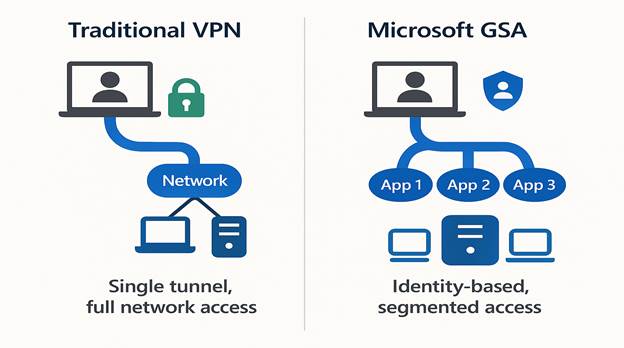
In an era where remote work, cloud adoption, and cyber threats dominate the IT landscape, organizations are rethinking how they secure access to corporate resources. Traditional VPNs, once the cornerstone of remote connectivity, are now considered a liability. Why? Because they operate on an outdated “all-or-nothing” model, granting broad network access once a user is connected.
Enter Microsoft Global Secure Access (GSA) a Security Service Edge (SSE) solution that redefines secure connectivity by embracing Zero Trust principles and an identity-first approach. In this blog, we’ll explore what GSA is, why it matters, its architecture, benefits, and how to implement it for your organization.
What is Microsoft Global Secure Access?
Microsoft GSA is a cloud-native security solution that replaces traditional VPNs with a modern, identity-centric model. It integrates deeply with Microsoft’s security ecosystem, including:
- Microsoft Entra ID (formerly Azure AD)
- Conditional Access
- Microsoft Defender
- Microsoft 365 Security Suite
Unlike legacy VPNs, GSA enforces least-privilege access, ensuring users only access what they need, when they need it—nothing more.
Why Traditional VPNs Are No Longer Enough
VPNs were designed for a world where:
- Employees worked primarily on premises.
- Applications were hosted in a single data center.
- Security threats were less sophisticated.
Today, the reality is different:
- Hybrid work is the norm.
- Applications are distributed across cloud and on premises.
- Cyberattacks exploit VPN weaknesses, such as credential theft and lateral movement.
Key Risks of VPNs:
- Broad network access increases attack surface.
- Lack of granular controls.
- Poor visibility into user activity.
Microsoft GSA: A Zero Trust Approach
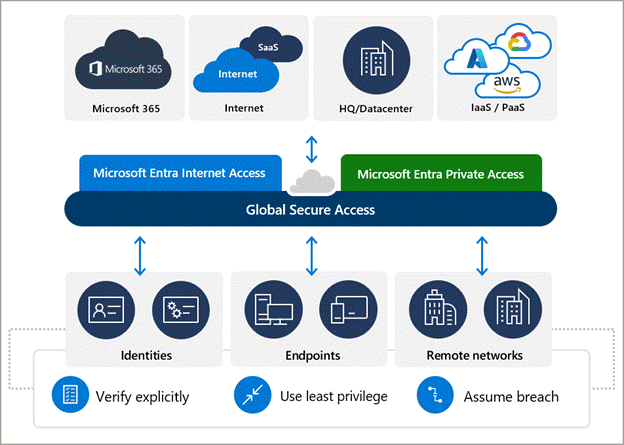
GSA is built on Zero Trust principles:
- Verify explicitly: Authenticate and authorize every request.
- Use least privilege: Grant minimal access required.
- Assume breach: Design systems to minimize impact.
Core Components of Microsoft GSA
Microsoft GSA offers three primary access profiles:
1. Private Access
- Securely connects users to private applications (on-premises or cloud).
- Micro-segmentation reduces attack surface.
- Quick Access Mode enables fast migration from legacy VPNs.
2. Internet Access
- Provides web category filtering, TLS inspection, and identity-based policy enforcement.
- Protects users from malicious websites and enforces compliance.
3. Microsoft 365 Access
- Routes Microsoft 365 traffic directly to Microsoft’s backbone.
- Restores source IP visibility, improving SOC analytics and Entra ID Protection.
Key Features and Benefits
1. Identity-First Security
- Deep integration with Microsoft Entra ID.
- Conditional Access policies based on user, device, and risk context.
2. Granular Access Control
- Apply policies at the application level, not the network level.
- Enforce device compliance before granting access.
3. Enhanced Visibility
- Advanced logging and analytics.
- TLS inspection for encrypted traffic.
- Enriched Microsoft 365 telemetry.
4. Seamless User Experience
- Lightweight agent (no heavy IPsec tunnels).
- Optimized routing for Microsoft 365 traffic.
How GSA Compares to Other SSE Solutions
While other SSE vendors offer similar capabilities, GSA stands out because:
- It’s natively integrated with Microsoft 365 and Entra ID.
- Offers source IP restoration for accurate security analytics.
- Provides a unified platform for identity and network security.
Implementation Roadmap
Step 1: Identify Use Cases
- Remote access to private apps.
- Secure internet browsing.
- Optimized Microsoft 365 connectivity.
Step 2: Deploy the GSA Client
- Install the lightweight endpoint agent on user devices.
Step 3: Integrate with Identity Tools
- Configure Conditional Access and device compliance policies.
Step 4: Build Policies
- Define granular access rules for private and internet traffic.
Step 5: Monitor and Optimize
- Use Microsoft’s advanced analytics for continuous improvement.
Real-World Use Case: Microsoft’s Own Transformation
Microsoft replaced its traditional VPN with GSA for 158,000+ employees. The result:
- Reduced attack surface.
- Improved user experience.
- Enhanced visibility for SOC teams.
Quote from Microsoft Digital:
“One of the primary reasons for this shift to GSA is that we get more granularity within this identity-based security solution that we can control access on a very fine level.”1
Conclusion
Microsoft Global Secure Access is not just a VPN replacement—it’s a strategic shift toward Zero Trust security and cloud-native networking. For organizations already invested in the Microsoft ecosystem, GSA offers a future-ready solution that enhances security, simplifies management, and improves user experience.
More can be found here.
Regards,
Prabhat Nigam
Global CTO | Golden Five
CEO | LAEXUG Foundation
