
And What Actions to Take in Different Cases
A practical guide for IT administrators and cybersecurity teams
Introduction
Email is essential for business communication, but it can also be abused for phishing, domain spoofing, and impersonation. DMARC (Domain-based Message Authentication, Reporting, and Conformance) works with SPF and DKIM to help domain owners monitor email authentication.
Aggregate reports from participating receiving providers show how messages using your domain performed during authentication checks. The goal is not simply to count failures; it is to understand why a result occurred and choose an appropriate response without accidentally blocking legitimate business email.
Here is a single pager cheat sheet. However, go through full blog for full details.
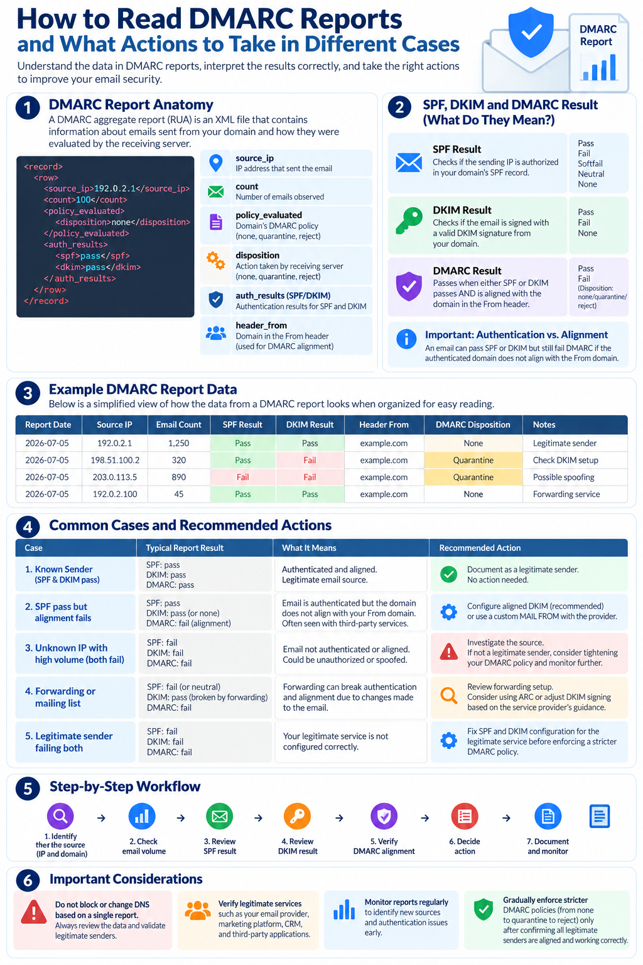
1. What Is a DMARC Aggregate Report?
A DMARC aggregate report, also called a RUA report, is a periodic summary of email authentication results provided by participating receiving email servers. Reports are commonly delivered as XML attachments, sometimes compressed as GZIP files.
They may include sending IP addresses, message counts, SPF and DKIM results, DMARC alignment/evaluation, reported disposition, reporting organization, and reporting period. These reports support monitoring; they do not necessarily identify every individual message or prove that a message was malicious.
2. Understand SPF, DKIM, and DMARC
SPF (Sender Policy Framework)
SPF checks whether the sending IP address is authorized by the SPF policy for the relevant envelope-sender domain. A passing SPF result does not automatically mean SPF aligns with the visible From domain.
Action: For a legitimate service that fails SPF, verify its sending IP, envelope-sender domain, and published SPF configuration. Change SPF only after confirming the correct settings with the provider.
DKIM (DomainKeys Identified Mail)
DKIM uses a cryptographic signature to help verify that a message was signed by a domain and that signed content has not been improperly modified.
Action: Check the service’s DKIM signing configuration, selector, published DNS public key, and whether the message is modified during delivery.
DMARC
DMARC checks whether SPF or DKIM passes with the required alignment to the domain in the visible From address. Either aligned SPF or aligned DKIM can be sufficient for DMARC to pass.
Action: Review the underlying SPF/DKIM results and domain alignment, then verify whether the sender is legitimate before changing the DMARC policy.
3. How to Read a DMARC Aggregate Report
| Field | Meaning | What to check |
| source_ip | IP address observed sending messages | Is it known and authorized? |
| count | Messages represented by the record | Is volume expected? |
| header_from | Domain in the visible From header | Is it your expected domain? |
| auth_results | Raw SPF and DKIM authentication results | Did either mechanism pass? |
| policy_evaluated | DMARC-related SPF/DKIM evaluation and disposition | Did required alignment pass? |
| disposition | Reported handling: none, quarantine, reject | What action did the receiver report? |
| report_metadata | Reporting organization, ID, and period | Who reported and when? |
Simplified XML example:
<record>
<row>
<source_ip>192.0.2.10</source_ip>
<count>125</count>
<policy_evaluated>
<disposition>none</disposition>
<dkim>pass</dkim>
<spf>pass</spf>
</policy_evaluated>
</row>
</record>
These are illustrative values, not results from a real domain. Here, 125 messages are represented by the record and SPF/DKIM pass the DMARC evaluation. If the source is approved and the results are expected, document it and continue monitoring.
Important: Raw SPF/DKIM results can differ from policy_evaluated when authentication passes for a domain that does not align with the visible From domain.
4. Common Scenarios and Recommended Actions
Case 1: SPF pass, DKIM pass, DMARC pass
Meaning: At least one authentication mechanism passes with DMARC alignment.
Action: Verify the source is authorized, document the service, and continue monitoring.
Case 2: SPF passes but DMARC fails
Meaning: SPF may pass for an envelope-sender domain that does not align with the visible From domain, and DKIM provides no aligned passing result.
Action: Verify the service and compare domains. Configure a custom return-path/envelope-sender domain or aligned DKIM, then test. Do not add IPs to SPF merely because alignment failed.
Case 3: DKIM passes but DMARC fails
Meaning: The signature may be valid, but the signing domain may not align with the visible From domain.
Action: Check the DKIM d= domain, configure custom DKIM signing with the provider, verify DNS, and test.
Case 4: Unknown IP; SPF and DKIM fail
Meaning: Could be spoofing, unauthorized sending, a misconfigured service, or another authentication issue. Failure alone does not prove an attack.
Action: Identify the source; compare volume and expected services; do not authorize it automatically; preserve evidence and escalate suspicious activity.
Case 5: Legitimate third-party service fails
Meaning: A CRM, marketing platform, or business application may not be configured correctly.
Action: Confirm the service is approved, follow its custom-domain SPF/DKIM instructions, verify alignment, and test before enforcing a stricter policy.
Case 6: Forwarding or mailing-list failures
Meaning: Forwarding can break SPF, while message modification may break DKIM.
Action: Verify the forwarding path, check whether DKIM remains intact, evaluate ARC where appropriate, and avoid broad exceptions.
Case 7: Sudden increase in sending volume
Meaning: Could be a campaign, new application, configuration change, or unauthorized activity.
Action: Compare with previous reports, confirm campaigns, validate the source, review authentication results, and escalate unexplained changes.
5. Quick Decision Table
| Finding | Possible interpretation | Recommended action |
| Known source; aligned SPF or DKIM passes | Expected authenticated traffic | Document and monitor |
| SPF passes but is not aligned | SPF alignment issue | Fix envelope-sender alignment or aligned DKIM |
| DKIM passes but is not aligned | Signing-domain mismatch | Configure custom DKIM |
| Unknown source; both aligned checks fail | Possible spoofing or unauthorized source | Investigate; do not authorize automatically |
| Known service; both fail | Misconfiguration or delivery-path issue | Verify provider and correct configuration |
| Forwarding-related failures | Forwarding or message modification | Review forwarding and ARC where appropriate |
| Unexpected volume increase | Campaign, new service, or suspicious activity | Validate source and investigate |
| Quarantine or reject disposition | Receiver reports enforcement handling | Verify cause and impact; receiver behavior can vary |
6. Understand DMARC Disposition
None
The report indicates that no DMARC disposition was applied to the messages in that record. Continue monitoring and investigate authentication failures even when disposition is none.
Quarantine
The receiver reports quarantine handling. Check whether legitimate mail is being sent to spam or otherwise handled unexpectedly, and correct authentication issues at the source.
Reject
The receiver reports reject handling. Determine whether the source is legitimate; correct authentication for legitimate services and investigate unauthorized sources.
Note: Reported disposition does not guarantee the final inbox outcome. Receiver behavior, local policy, and other authentication mechanisms can affect delivery.
7. How to Prioritize DMARC Issues
High priority
- Unknown sending sources with suspicious volumes.
- Evidence of unauthorized domain use.
- Legitimate business email being rejected because of authentication misconfiguration.
- Sudden, unexplained changes in sending behavior.
Medium priority
- Known services with SPF or DKIM alignment issues.
- Repeated failures from identified applications.
- Forwarding or mailing-list problems affecting delivery.
Routine monitoring
- Known and approved sources passing DMARC.
- Expected sending patterns without unusual findings.
- Previously investigated sources that remain stable.
These are operational guidelines. Adapt priorities to your organization’s threat model, business criticality, and incident response procedures.
8. Build a DMARC Monitoring Workflow
1. Collect reports: Use a dedicated mailbox or reporting service.
2. Parse XML files: Extract reporting period, sending IP, message count, authentication results, domains, and disposition.
3. Identify known sources: Maintain an inventory of approved email providers, CRM platforms, marketing systems, and applications.
4. Investigate failures: Compare with previous periods, verify unknown sources, and identify authentication/alignment problems.
5. Document remediation: Record the affected service, root cause, action, owner, and verification result.
6. Review policy: After confirming legitimate sources authenticate correctly, consider moving from monitoring to quarantine or rejection.
Avoid enforcement changes before verifying all important business sending services.
9. Best Practices
- Review reports regularly, especially after deploying a new email service.
- Maintain an inventory of authorized sending sources.
- Investigate failures using both raw authentication results and alignment results.
- Avoid adding unknown IP addresses to SPF without verification.
- Avoid broad SPF exceptions or unnecessary DNS changes.
- Test configuration changes before increasing enforcement.
- Preserve historical reports to identify trends.
- Automate parsing and consolidation when report volumes become difficult to manage.
- Document findings so recurring issues can be resolved faster.
Conclusion
DMARC aggregate reports provide visibility into how receiving email servers evaluate messages sent using your domain. The goal is not simply to count failures, but to understand their cause and take the correct action.
A known service with an alignment issue requires a different response from an unknown source with a high volume of failed messages. Forwarding-related failures also require a different investigation from a legitimate application that has not been configured for DKIM signing.
By reviewing source IPs, message counts, SPF and DKIM results, domain alignment, and reported dispositions, IT and security teams can make better decisions about email authentication and domain protection.
Further Reading
- Microsoft Learn — Configure DMARC: https://learn.microsoft.com/en-in/defender-office-365/email-authentication-dmarc-configure
- Google Workspace — About DMARC reports: https://knowledge.workspace.google.com/admin/security/about-dmarc-reports
- Google Workspace — Troubleshoot DMARC issues: https://knowledge.workspace.google.com/admin/security/troubleshoot-dmarc-issues
